From panel to parametric. The leap between generations.It seems to be just the beginning.
http://ffffound.com/image/058618b48c6936b372880e7ccd793a8709e27b75?c=10764830

http://www.shukino.com/wp-content/uploads/2013/09/20130703129.jpg
“Like the experimental theories that opened up so many potential lines of research from the Macy Conference, which are so pervasive and embedded in our society today, the premise raised here is to connect the aspect of the computational processes of design, in our case, scripting, to the processes of inhabitation, or experience. When experience and method becomes fused into a co-evolving process, what evolves is an architectural machinic relationship embedded in the broader discourse of the discipline. We are encroaching on a social shift that is changing due to rapid development in processual operations. We constantly mediate between the real world and the digital world, through the virtualizations of infrastructure.”” – page 165/Chapter : Scripting Intelligent Infrastructures and Building Societies. I have not seen one single example of connection between the processes of scripting and inhabitation anywhere in the book. My believe is that if an author speaks about some major effort to the public ( because quite frankly this is the meager effort here – to overlap the huge gap between 3D and reality) he should give an example of this effort or at least propose a probable solution. Or in the very least talk about a probable solution, witch is not the case. I did spot a similar problem with the next sentence. The Author just makes a statement without providing any evidence about this encroaching on a social shift. Its true that society is constantly changing, now more rapidly than ever, because of the rapidly changing technology. Technology that allows us to change our surroundings in every aspect in ways bot known and unknown, imaginable and unimaginable. But if we are speaking about a specific shift in society, than I expect some examples. During the lectures we had on Thursday and Friday Mr. Leach expressed the opinion that for different reasons (like financial, educational, technological-availability and even conservative narrow minded people) parametric design today mostly remains in the 3D world and for the most part is not implemented in the physical world. There are many and more projects with a morph designs but how many are actually the buildings build according to those designs? The answer is obvious if we just look around. Even the buildings that are made using parametric design (like the example Mr. Leach gave us with F. Ghery`s building in Bilbao) are most of the time just “decorated sheds” – a faced that has nothing to do with the actual structure. In other words we have bones and skin that come from two different worlds. So now comes the question : Are the parametric tools and the whole computational approach to architecture just a way to achieve aesthetics? This was my opinion before being encountered with Neil Leach and his work. Now i am not so sure. At first it looks to be the case, however when you read something like “Logic should be the new form.” page 13 /Chapter :”Parametrics Explained” you start to question the obvious. If the parameters put in the software are based on logical goals (like obtaining the best shadings, viewpoints, solar exposure etc.) than the result will be more than just aesthetics, it will be even more than just function. The result will be an aesthetic and functional design. A dream come true for any architect in theory. In reality most of the time aesthetics like this increase the costs of the buildings, so the designer is bound to obtain the basic functions ( I am not talking about the star projects with unlimited financial power behind, I am referring to the rest of the architecture, those 99.99% that no one seems to mention) with as little cost as possible and do whatever he can using the available materials to improve the aesthetics. So even though there was no example like this in the book, I would like to mention one from the lecture. I am referring to the example about the combined use of parametric design applayed with digital fabrication and actually implemented into a real building. This was a project in Japan, and the implementation was a CNC Milling fabricating decorative wooden panels. Even tough we speak again just about an aesthetic function it is still a direct example about the implementation of a parametric design into an actual nonfictional building. I find those examples fascinating. That is probably the reason why I insist to have them in both books and lectures. Because that is what we learn from. Real life examples. Genuine life experience .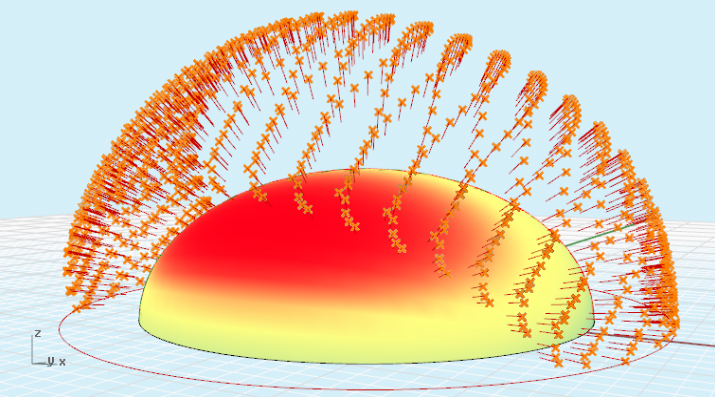
http://ppd-spr2010.tumblr.com/page/3
In today’s online world, the options for casino gaming are endless. However, it can be daunting to find a casino that fits your budget and preferences. Luckily, there are no minimum deposit casinos in Australia that offer players the opportunity to start playing with small amounts of money, making it accessible for everyone. To find these casinos, simply visit the following website to browse and compare the best options. With a wide range of games, secure payment methods, and excellent customer service, these no minimum deposit casinos are perfect for those who want to have fun and potentially win big without breaking the bank.
Captain Cooks Casino Canada boasts an impressive selection of games that cater to a range of players with varying interests. Players can indulge in popular titles such as Mega Moolah, Immortal Romance, and Thunderstruck II, among others. But what really sets Captain Cooks apart is its generous sign up bonus offer. New players can take advantage of the casino’s 100 chances to become an instant millionaire for just $5. This offer is valid for play on the popular Mega Moolah progressive jackpot slot game. So, if you’re a thrill seeker looking for a chance to strike gold, Captain Cooks casino Canada sign up bonus may just be the perfect destination.