randomising surface division_

May 9th, 2008 vagia.pantou@iaac.net Posted in _Anastasia Fragoudi, Scripting 1, _Vagia Pantou | No Comments »

 image1.jpg

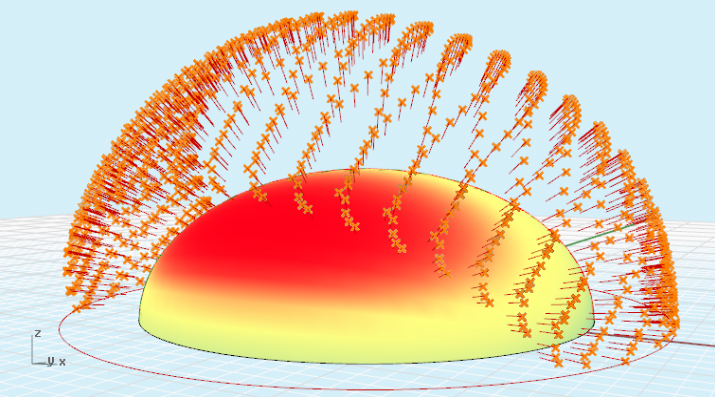
below you can find the script that generated the upper form

link to the files here 

Option Explicit
‘Script written by <iaac scripting seminar Carlos de la Barrera and Luis Fraguada_ students: vagia pantou, anastasia fragkoudi>
‘Script copyrighted by <insert company name>
‘Script version Τρίτη, 15 Απριλίου 2008 12:03:22 μμ

‘pseudo code
‘we will catch the surface
‘we will analyse the surface
‘we populate a surface, On the surface, To calculate the vectors To extrude
’somethin like a box

Call Main()
Sub Main()

‘input
Dim strsurface
strsurface = Rhino.GetObject(”sel my surface”, 8)
If isNull (strsurface) Then Exit Sub

‘declare variables
Dim udom, vdom, uparam, vparam, arrpt
Dim i, j, udiv, vdiv

‘the divisions on the surface
udiv = 30
vdiv = 30

‘here i create my array
ReDim colec2d(udiv, vdiv)

‘here i am capturing the domain of the surface
udom = Rhino.SurfaceDomain(strsurface,0)
vdom = Rhino.SurfaceDomain(strsurface,1)

‘my nested looping
For i = 0 To udiv
For j = 0 To vdiv

‘calc the point on the surface
uparam = udom(0) + i * ((udom(1) - udom(0))/udiv)
vparam = vdom(0) + j * ((vdom(1) - vdom(0))/vdiv)

‘here i transform to the R2 dimension to R3 dimension
arrpt = Rhino.EvaluateSurface(strsurface, array(uparam, vparam))

‘printing the point
‘Call Rhino.AddPoint(arrpt)

’store the array
colec2d(i,j) = arrpt

Next
Next

‘new variables
Dim pt1, pt2, pt3, pt4, pt5

‘looping pass over the matrix of the array
For i = 0 To udiv - 1
For j = 0 To vdiv - 1

pt1 = colec2d(i, j)
pt2 = colec2d(i, j + 1)
pt3 = colec2d(i + 1, j +1)
pt4 = colec2d(i + 1, j)
pt5 = colec2d(i, rnd * j)

‘here i return a value of the function in the same line
Dim quad: quad = myfuncSurface1(pt1, pt2, pt4)
Dim quad2: quad2 = myfuncSurface2(pt2, pt3, pt5)

Next
Next

Call Rhino.DeleteObject (strsurface)

End Sub

Function myfuncSurface1(pt1, pt2, pt4)

Dim surf1: surf1 = Rhino.AddSrfPt(Array(pt1, pt2, pt4))

‘the result of my function
myfuncSurface1 = surf1

End Function

Function myfuncSurface2(pt2, pt3, pt5)

Dim surf2: surf2 = Rhino.AddSrfPt(Array(pt2, pt3, pt5))

‘the result of my function
myfuncSurface2 = surf2

End Function

AddThis Social Bookmark Button

bubbles_

May 9th, 2008 vagia.pantou@iaac.net Posted in _Anastasia Fragoudi, Scripting 1, _Vagia Pantou | No Comments »

image.jpg

the script that generated the upper form was by changing the parameters of the scripts given after the first two classes.

link to the files by clicking here

Option Explicit
‘Script written by <iaac scripting seminar Carlos de la Barrera and Luis Fraguada_ students: vagia pantou, anastasia fragkoudi>
‘Script copyrighted by <insert company name>
‘Script version Τετάρτη, 9 Απριλίου 2008 1:01:26 μμ

Call Main()
Sub Main()

Dim Bigcolec (100)
Dim i
Dim strcurve
Dim colec2 (50)
Dim div
Dim domU1
Dim param1
Dim pt2
Dim dblradius, radius1, radius2

div = 50
radius1 = 10
radius2 = 20
dblradius = 1

For i = 0 To UBound(Bigcolec)

Bigcolec(i) = array(rnd * 400, rnd * 400, rnd * 400)

Next

If isArray(Bigcolec) Then

Call Rhino.Addpoints (bigcolec)
Call Rhino.AddCurve(bigcolec,3)

End If

For i = 0 To UBound(Bigcolec)

Call Rhino.AddSphere(bigcolec(i),rnd * radius1)
Next

strCurve = Rhino.GetObject(”set my first curve”,4)
If IsNull(strCurve) Then Exit Sub

domU1 = Rhino.CurveDomain(strCurve)

For i = 0 To div

Param1 = domU1(0) + i * ((domU1(1) - domU1(0)) / div)
pt2 = Rhino.EvaluateCurve(strCurve, Param1)

colec2(i) = pt2
Call Rhino.AddPoint (pt2)
Call Rhino.AddSphere (pt2, rnd * radius2)

Next

Dim j

For i = 0 To UBound(Bigcolec)

For j = 0 To div

If Rhino.Distance(bigcolec(i), colec2(j))<75 Then

Call Rhino.AddCylinder(bigcolec(i), colec2(j),dblRadius)

End If
Next

Next

End Sub

AddThis Social Bookmark Button

Visual data - connections

May 8th, 2008 monica.szawiola@iaac.net Posted in Scripting 2, Term III, _Monica Szawiola | No Comments »

This function is connecting every singel point with another creating lines.

lines1.jpg

Option Explicit
‘Script written by <Monika Szawiola>
‘Script copyrighted by <insert company name>
‘Script version 5 maja 2008 23:04:17
Call Main
Sub Main

Dim arrPoints
Dim i, j

arrPoints = Rhino.GetPoints(vbTrue, vbTrue, “Select points”)

If ubound(arrPoints)>0 Then

For i = 0 To ubound(arrPoints)

If ubound(arrPoints)>i Then

For j = i+1 To Ubound(arrPoints)

Rhino.AddLine arrPoints(i),arrPoints(j)
Next

End If

Next

End If

End Sub

AddThis Social Bookmark Button

Visual data - graph

May 8th, 2008 monica.szawiola@iaac.net Posted in Scripting 2, Term III, _Monica Szawiola | No Comments »

diagram.jpg

Call Main()
Sub Main()
Dim arrPlane
Dim R, ilosc, i, sections, domain, colec, starcurve

Const xlDown = -4121 ‘xlScope
Dim strFileName, dblX, dblY, dblZ
Dim xlApp, xlSheet, nRow, nRowCount
Dim aPoints()
Dim cnt

Dim tekst(), txt
strFileName = Rhino.OpenFileName(”Select File”,”Excel Files (*.xls)|*.xls||”)
If IsNull(strFileName) Then Exit Sub

Set xlApp = CreateObject(”Excel.Application”)
xlApp.Workbooks.Open(strFileName)
Set xlSheet = xlApp.ActiveSheet
nRowCount = xlSheet.Range(”b1″, xlSheet.Range(”b1″).End(xlDown)).Rows.Count

Rhino.Print “Importing data…”

‘Rhino.EnableRedraw(False)

For nRow = 1 To nRowCount

ReDim Preserve tekst(nRow-1)

dblX = xlSheet.Cells(nRow, 2).Value
dblY = xlSheet.Cells(nRow, 3).Value

If IsNull(dblX) Then

xlApp.Quit

Set xlSheet = Nothing

Set xlApp = Nothing

Rhino.Print “Non data found in row ” & CStr(nRow) & “.”

‘ Rhino.EnableRedraw(True)

Exit Sub

Else

rhino.Print dblX
tekst(nrow-1) = array(CStr(dblX),CInt(dblY))

End If

Next

‘Rhino.EnableRedraw(True)

arrPlane = Rhino.WorldXYPlane

strCurve = Rhino.AddCircle (arrPlane, 40)

starting = Rhino.CurveStartPoint (strCurve)

punkty = Rhino.DivideCurve (strCurve, ubound(tekst)+1, True)

For i = 0 To ubound(tekst)

txt = Rhino.AddText (tekst(i)(0), punkty(i), 3)
Rhino.RotateObject txt, punkty(i), 360/ubound(tekst)*i

Next

Call xlIn2(strFileName)

End Sub

Sub xlIn2(strFileName)

‘ Declare variables and constants

Const xlDown = -4121 ‘xlScope
Dim dblX, dblY, dblZ, arr2, point, points
Dim xlApp, xlSheet, nRow, nRowCount
Dim aPoints()
Dim cnt

Dim odl, line, a

a = 41 ‘ number of elements in a column

odl = 35
Set xlApp = CreateObject(”Excel.Application”)
xlApp.Workbooks.Open(strFileName)
Set xlSheet = xlApp.ActiveSheet
nRowCount = xlSheet.Range(”d1″, xlSheet.Range(”d1″).End(xlDown)).Rows.Count

Rhino.Print “Importing data…”
If (nRowCount = 0 ) Then

Rhino.Print “No data range found in file.”

Exit Sub

End If

ReDim aPoints(nRowCount-1)

‘ Rhino.EnableRedraw(False)

For nRow = 1 To a

dblX = xlSheet.Cells(nRow, 2).Value
dblY = xlSheet.Cells(nRow, 3).Value
If IsNumeric(dblY) Then
line = Rhino.Addline (array(0,odl,0),array(0,odl+(-dblY/1000),0))
Rhino.RotateObject line, array(0,0,0), 360/a*(nRow-1)

Else

xlApp.Quit

Set xlSheet = Nothing

Set xlApp = Nothing

Rhino.Print “Non-numeric data found in row ” & CStr(nRow) & “.”

Rhino.EnableRedraw(True)

Exit Sub

End If

Next

End Sub

AddThis Social Bookmark Button

next script

May 8th, 2008 agata.kycia@iaac.net Posted in Scripting 2, Term III, _Krzysztof Gornicki, _Agata Kycia | No Comments »

poduchy2.png

Option Explicit

Call Main()
Sub Main()

‘variables
Dim strSrf
Dim arrDomU, arrDomV, arrPt
Dim dblParamU, dblParamV
Dim i, j, intDivU, intDivV

‘inputs
strSrf = Rhino.GetObject(”sel the surface”,8)
If isnull(strSrf) Then Exit Sub ‘in the case i want to scape the script

‘number of the divisions
intDivU = 7
intDivV = 7

‘arrays declaration
ReDim collect1(intDivU, intDivV)

‘catch the surface    the min and max in both directions u, v
arrDomU = Rhino.SurfaceDomain(strSrf,0)
arrDomV = Rhino.SurfaceDomain(strSrf,1)

‘here we evaluate boths surfaces with the same loop
For i = 0 To intDivU
For j = 0 To intDivV

‘here we calculate the point for boths surfaces
dblParamU = arrDomU(0) + i * ((arrDomU(1) - arrDomU(0)) / intDivU)
dblParamV = arrDomV(0) + j * ((arrDomV(1) - arrDomV(0)) / intDivV)

‘here we “fix” the point on the surface, with this function we can get a lot info from the surface
arrPt = Rhino.SurfaceCurvature(strSrf, array(dblParamU, dblParamV))
Rhino.AddPoint arrPt(0)
collect1(i,j) = arrPt(0)  ‘<- store inside of the array

Next
Next

‘here assign names for the points that i want to pass
Dim Npoint, Npoint2, Npoint3, Npoint4

‘this is the ubication for every point
Npoint  = collect1(1, 1)
Npoint2 = collect1(1, 2)
Npoint3 = collect1(2, 2)
Npoint4 = collect1(2, 1)

‘you know that
For i = 0 To (intDivU - 1)
For j = 0 To (intDivV - 1) ‘<- for stay inside of the loop

’so here every point has his real position for the loop
Npoint = collect1(i, j)
Npoint2 = collect1(i, j + 1)
Npoint3 = collect1(i + 1, j + 1)
Npoint4 = collect1(i + 1, j)

Call MyFuncPoint(Npoint, Npoint2, Npoint3, Npoint4, strSrf)

Next
Next

Rhino.HideObject strSrf

End Sub

Function MyFuncPoint(a, b, c, d, surface)

Dim F, pointF
Dim arrRndPt, RndPt
Dim line1, line2, line3, line4, P1, P2, P3, P4
Dim Nline1, Nline2, Nline3, Nline4, arrpoint1, arrpoint2, arrpoint3, arrpoint4
Dim surface1, curve1, planar1, curve2, planar2
Dim cur, cur2, cur3, cur4, finalcur, finalcur2

F = Array((a(0) + c(0))/ 2, (a(1) + c(1))/ 2, (a(2) + c(2))/ 2)
pointF = rhino.addpoint(F)

line1 = Rhino.AddLine(a, b)
P1 = Rhino.CurveMidPoint(line1)

line2 = Rhino.AddLine(b, c)
P2 = Rhino.CurveMidPoint(line2)

line3 = Rhino.AddLine(c, d)
P3 = Rhino.CurveMidPoint(line3)

line4 = Rhino.AddLine(d, a)
P4 = Rhino.CurveMidPoint(line4)

Nline1 = Rhino.AddLine(P1, P2)
arrpoint1 = Rhino.DivideCurve (Nline1, 3, True)

Nline2 = Rhino.AddLine(P2, P3)
arrpoint2 = Rhino.DivideCurve (Nline2, 3, True)

Nline3 = Rhino.AddLine(P3, P4)
arrpoint3 = Rhino.DivideCurve (Nline3, 3, True)

Nline4 = Rhino.AddLine(P4, P1)
arrpoint4 = Rhino.DivideCurve (Nline4, 3, True)

cur = Rhino.AddCurve (array(a, arrpoint4(1), arrpoint3(2), d))
cur2 = Rhino.AddCurve (array(d, arrpoint3(1), arrpoint2(2), c))
cur3 = Rhino.AddCurve (array(c, arrpoint2(1), arrpoint1(2), b))
cur4 = Rhino.AddCurve (array(b, arrpoint1(1), arrpoint4(2), a))

finalcur = Rhino.JoinCurves(array(cur, cur2, cur3, cur4), True)

curve1 = Rhino.AddPolyline (array(a,b,c,a))
planar1 = Rhino.AddPlanarSrf (array(curve1))

curve2 = Rhino.AddPolyline (array(a,b,c,d,a))

Dim Distance1: Distance1 = Rhino.Distance(a,b)/3

Dim Hpoint: Hpoint = funcplane(planar1, Distance1)
Dim H: H = Rhino.AddPoint (Hpoint)

Dim Hpoint2: Hpoint2 = funcplane(planar1, Distance1/3)
Dim H2: H2 = Rhino.AddPoint (Hpoint2)

Dim Lpoint: Lpoint = funcplane(planar1, -Distance1/7)
Dim L: L = Rhino.AddPoint (Lpoint)

Dim planarCent: planarCent = Rhino.SurfaceAreaCentroid(planar1(0))

finalcur2 = Rhino.CopyObject(finalcur(0), planarCent(0), Lpoint)
Rhino.AddLoftSrf (array(finalcur(0),finalcur2))

Dim arrpatch: arrpatch = array(finalcur(0), H)

Rhino.UnselectAllObjects
Rhino.SelectObjects (arrpatch)

Rhino.Command (” _-Patch ” & ” _enter “)

Rhino.HideObject planar1(0)

Dim arrpatch2: arrpatch2 = array(finalcur2, H2)
Rhino.UnselectAllObjects
Rhino.SelectObjects (arrpatch2)

Rhino.Command (” _-Patch ” & ” _enter “)

End Function

Function funcplane(S, Distance)

Dim arrPlane, arrNormal, arrCent, arrParam, arrPt1
Dim strView, Surf, arrsrfdata

Surf = S(0)

strView = Rhino.CurrentView
Rhino.ViewCPlane strView, Rhino.WorldXYPlane

arrCent = Rhino.SurfaceAreaCentroid(Surf)

arrParam = Rhino.SurfaceClosestPoint(Surf,arrCent(0))

arrNormal = Rhino.SurfaceNormal(Surf,arrParam)
arrPlane = Rhino.PlaneFromNormal(arrCent(0),arrNormal)

Rhino.ViewCPlane strView, arrPlane
arrsrfdata = Rhino.SurfaceCurvature (Surf, arrParam)

arrPt1 = funcCPlanePoint(array(0,0,Distance))

funcPlane = arrPt1

strView = Rhino.CurrentView
Rhino.ViewCPlane strView, Rhino.WorldXYPlane

End Function

Function funcCPlanePoint(inPoint)

Dim arrPoint, arrPlane

funcCPlanePoint = vbNull

arrPoint = inPoint

If IsArray(arrPoint) Then

arrPlane = Rhino.ViewCPlane(Rhino.CurrentView)

funcCPlanePoint = Rhino.XformCPlaneToWorld(arrPoint, arrPlane)

End If

End Function

AddThis Social Bookmark Button

Work in Progress

May 7th, 2008 rohan.khurana@iaac.net Posted in Scripting 2, Term III, _Rohan Khurana | No Comments »

2.jpg3.jpg

Here are some attempts to make a module with a fixed square base and a random angled top. This can be done with a random vector for the top co ordinates. You can download the script at  http://www.mediafire.com/?tzfyy0zg4xm.

AddThis Social Bookmark Button

May 7th, 2008 juergen.weiss@iaac.net Posted in Scripting 2, Term III, _Juergen Weiss | No Comments »

layout-weaving.jpg

I developed  a new script. It is kind of weaving structure. 

Here the script weaving.zip

AddThis Social Bookmark Button

concentric packing with hexagonal grid

May 7th, 2008 hemant.purohit@iaac.net Posted in Scripting 2, _Renu Gupta, _Hemant Purohit, _Francisca Aroso | No Comments »

1. Another way to see the problem is to move from periphery to centre in a circular fashion rather than in a rectilinear filling up of the container

2a.jpg

script

offset-curve-fifth.zip

AddThis Social Bookmark Button

tangent

May 7th, 2008 hemant.purohit@iaac.net Posted in Scripting 2, _Renu Gupta, _Hemant Purohit, _Francisca Aroso | No Comments »

 1. Packing problem simplified (reduced) to a generic case of circles in circle or spheres in circle.

2. Packing problem understood as a problem of tangency.

3. All circles have to be tangent to each other and then multiply (tangentially) in hexagonal fashion.

4. Packing must start from one quadrant point of the container circle.

1a.jpg

1b.jpg

1c.jpg

scripts here

trd-attempt.zip

seventh-attempt-with-spheres.zip

AddThis Social Bookmark Button

liveLink_data2pointsOnSurface

May 7th, 2008 pete.booth@iaac.net Posted in Scripting 2, Term III, _Pete Booth | No Comments »

Moving right along form the last post, I have now combined the data read script as a function into a new script that actually does something remotely interesting! The script reads the data, stores it in an arra and then uses this data to propagate a surface with the specific number of random points. It continues through the dataset, propagating each value of points on a new layer, so eventually it will create a file that has a base surface, with x number of layers, each with a unique number of points in a different color.

It isn’t very intelligent yet, as it tends to put a lot of values near the edges of the surface, but with a bit of proximity detection it should be able to scatter the points more evenly. Hopefully this script will evolve into a packing script of some description. That is the ultimate aim, but i’ve already achieved the most important part of (semi)live data transfer to the rhino environment.

download the script here

AddThis Social Bookmark Button