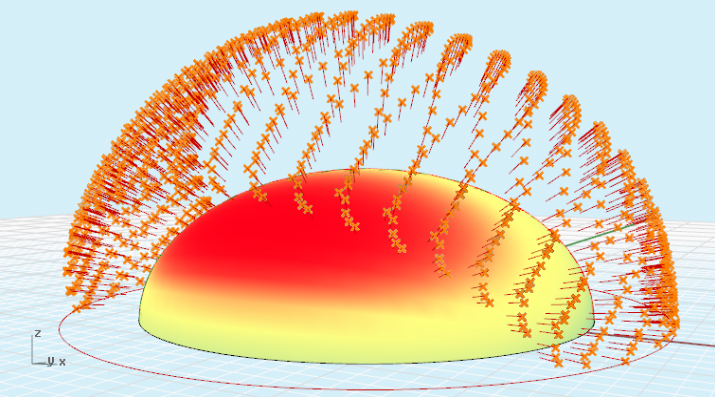
May 19th, 2008 peerapong.suntinanond@iaac.net Posted in Scripting 2, _Peerapong Suntinanond | No Comments »

35.jpg29.jpg114.jpg12.jpg

Option Explicit
‘Script written by
‘Script copyrighted by
‘Script version 29 มกราคม 2551 17:59:35

Call Main()
Sub Main()

Dim strsurface, Udomain, Vdomain, Uparam, Vparam, arrpoint
Dim i, j, secu, secv

secu = 10
secv = 5

ReDim colec(secu, secv)

‘input
strsurface = Rhino.getobject (”sel the surface”, 8)
If isnull(strsurface) Then Exit Sub ‘in case i want to scape the script

‘catch the surface the min and max in both direction u, v
Udomain = Rhino.SurfaceDomain(strsurface,0)
Vdomain = Rhino.SurfaceDomain(strsurface,1)

‘looping
For i = 0 To secu
For j = 0 To secv

‘here we calculate the point on the surface
Uparam = Udomain(0) + i * ((Udomain(1) - Udomain(0)) / secu-rnd)
Vparam = Vdomain(0) + j * ((Vdomain(1) - Udomain(0)) / secv)

‘here we fix the point on the curve
arrpoint = Rhino.EvaluateSurface(strsurface, array(Uparam, Vparam))
Rhino.AddPoint arrpoint

colec(i,j) = arrpoint

Next
Next

Dim newpoint, newpoint2, newpoint3, newpoint4

newpoint = colec(1,1)
newpoint2 = colec(1,2)
newpoint3 = colec(2,2)
newpoint4 = colec(2,1)

For i = 0 To secu - 1
For j = 0 To secv - 1

newpoint = colec(i,j)
newpoint2 = colec(i, j + 1)
newpoint3 = colec(i + 1, j + 1)
newpoint4 = colec(i + 1, j)

Call mifunction(newpoint, newpoint2, newpoint3, newpoint4)

Next
Next

Rhino.HideObject strsurface

End Sub

Function mifunction(a, b, c, d)

‘defining variables
Dim line1, F
Dim planarsrf1, distance1, distance2, HighPoint
Dim planarsrf2, HighPoint2
Dim pl1, pl2, pl3
Dim R
Dim S

R = 0.04
S = 0.06
line1 = Rhino.AddLine (a,c)
F = Rhino.CurveMidPoint(line1)

‘Rhino.AddPoint F

planarsrf1 = Rhino.AddSrfPt (array(a,d,c))
planarsrf2 = Rhino.AddSrfPt (array(a,b,c))

distance1 = -0.6
distance2 = 0.6

HighPoint = funcplane(planarsrf1, distance1, F)
Rhino.AddPoint HighPoint

HighPoint2 = funcplane(planarsrf2, distance2, b)

Dim cyl1: cyl1= Rhino.AddCylinder(a, HighPoint2, R)
Dim cyl2: cyl2= Rhino.AddCylinder(c, HighPoint2, R)
Dim cyl3: cyl3= Rhino.AddCylinder(a, HighPoint, R)
Dim cyl4: cyl4= Rhino.AddCylinder(c, HighPoint, R)
Dim cyl5: cyl5= Rhino.AddCylinder(a, d, R)
Dim cyl6: cyl6= Rhino.AddCylinder(d, c, R)
Dim cyl7: cyl7= Rhino.AddCylinder(d, HighPoint, R)
Dim cyl8: cyl8= Rhino.AddCylinder(b, HighPoint2, R)

Rhino.AddSphere a, S
Rhino.AddSphere d, S
Rhino.AddSphere c, S
Rhino.AddSphere HighPoint, S
Rhino.AddSphere HighPoint2, S
Rhino.AddSphere b, S

pl1 = Rhino.AddSrfPt(array(d, a, HighPoint))
pl2 =Rhino.AddSrfPt(array(d, c, HighPoint))
pl3 = Rhino.AddSrfPt(array(a, c, HighPoint2))

Dim AA: AA = funcplane(pl1, R, A)
Dim DD: DD = funcplane(pl1, R, D)
Dim HH1: HH1 = funcplane(pl1, R, HighPoint)

Dim plhigh1: plhigh1 = Rhino.AddSrfPt(array(AA, DD, HH1))

Dim CC: CC = funcplane(pl2, -R, C)
Dim DD2: DD2 = funcplane(pl2, -R, D)
Dim HH11: HH11 = funcplane(pl2, -R, HighPoint)

Dim plhigh2: plhigh2 = Rhino.AddSrfPt(array(DD2, CC, HH11))

Dim AA2: AA2 = funcplane(pl3, -R, A)
Dim CC2: CC2 = funcplane(pl3, -R, C)
Dim HH2: HH2 = funcplane(pl3, -R, HighPoint2)

Dim plhigh3: plhigh3 = Rhino.AddSrfPt(array(AA2, CC2, HH2))

Rhino.HideObject pl1
Rhino.HideObject pl2
Rhino.HideObject pl3
Rhino.HideObject planarsrf1
Rhino.HideObject planarsrf2
Rhino.HideObject line1

End Function

Function funcplane(S, Distance, A)

Dim arrPlane, arrNormal, arrCent, arrParam, arrPt1
Dim strView, Surf, arrsrfdata

Surf = S

strView = Rhino.CurrentView
Rhino.ViewCPlane strView, Rhino.WorldXYPlane

arrParam = Rhino.SurfaceClosestPoint(Surf,A)

arrNormal = Rhino.SurfaceNormal(Surf,arrParam)
arrPlane = Rhino.PlaneFromNormal(A,arrNormal)

Rhino.ViewCPlane strView, arrPlane
arrsrfdata = Rhino.SurfaceCurvature (Surf, arrParam)

arrPt1 = funcCPlanePoint(array(0,0,Distance))

funcPlane = arrPt1

strView = Rhino.CurrentView
Rhino.ViewCPlane strView, Rhino.WorldXYPlane

End Function

Function funcCPlanePoint(inPoint)

Dim arrPoint, arrPlane

funcCPlanePoint = vbNull

arrPoint = inPoint

If IsArray(arrPoint) Then

arrPlane = Rhino.ViewCPlane(Rhino.CurrentView)

funcCPlanePoint = Rhino.XformCPlaneToWorld(arrPoint, arrPlane)

End If

End Function

AddThis Social Bookmark Button

Final Presentation

May 19th, 2008 ramon.velazquez@iaac.net Posted in Scripting 2, _Ramon Velazquez | No Comments »

112.jpg26.jpg34.jpg42.jpg53.jpg62.jpg72.jpg82.jpg92.jpg

AddThis Social Bookmark Button

Buenos Aires Scripting Roof

May 19th, 2008 ramon.velazquez@iaac.net Posted in _Ramon Velazquez | No Comments »

bsas.jpg

buenos-aires.xls

Option Explicit
‘Script written by Ramon Velazquez
‘Script copyrighted by <insert company name>
 ’Script version Saturday, May 03, 2008 11:38:07 PM
Call xlIn2()

Sub xlIn2()
 Const xlDown = -4121 ‘xlScope
 Dim strFileName, dblX, dblY, dblZ
 Dim xlApp, xlSheet, nRow, nRowCount
 Dim  aPoints()
 Dim cnt

 strFileName = Rhino.OpenFileName(”Select File”,”Excel Files (*.xls)|*.xls||”)
 If IsNull(strFileName) Then Exit Sub
 
 Set xlApp = CreateObject(”Excel.Application”) 
 xlApp.Workbooks.Open(strFileName)   
 Set xlSheet = xlApp.ActiveSheet
 

 nRowCount = xlSheet.Range(”a1″, xlSheet.Range(”a1″).End(xlDown)).Rows.Count
 Rhino.Print “Importing data…”
 
 If (nRowCount = 0 ) Then

  Rhino.Print “No data range found In file.”

  Exit Sub

 ElseIf (nRowCount < 2 ) Then

  Exit Sub

 End If

 ReDim aPoints(nRowCount-2)
 Rhino.EnableRedraw(False)

 For nRow = 2 To nRowCount 

  dblX = xlSheet.Cells(nRow, 1).Value

  dblY = xlSheet.Cells(nRow, 2).Value

  dblZ = xlSheet.Cells(nRow, 3).Value

  If IsNumeric(dblX) And IsNumeric(dblY) And IsNumeric(dblZ) Then

   Call Rhino.AddPoint(array(dblX,dblY,dblZ))
  
   aPoints(nRow-2) = array(dblX,dblY,dblZ)
                                                 
  
  End If
  
  
 Next
 

 If (UBound(aPoints) > 0) Then
  
 
  Dim intdeg, strcurve 
 
 
  intdeg = xlSheet.Cells(10, 9).Value
  
 
  strcurve = Rhino.AddCurve (aPoints, CInt (intdeg))
  
 
  Const rhObjectCurve = 4
  

 End If
 

 Dim intdeg2, intdeg3, intdeg4, intdeg5, intdeg6, intdeg7, strPath


 intdeg2 = xlSheet.Cells(1, 10).Value
  
 intdeg3 = xlSheet.Cells(1, 11).Value
  
 intdeg4 = xlSheet.Cells(1, 12).Value
  
 intdeg5 = xlSheet.Cells(2, 10).Value
  
 intdeg6 = xlSheet.Cells(2, 11).Value
  
 intdeg7 = xlSheet.Cells(2, 12).Value
 

 strPath = Rhino.AddLine(Array(intdeg2,intdeg3,intdeg4), Array(intdeg5,intdeg6,intdeg7))


 If IsNumeric(intdeg2) And IsNumeric(intdeg3) And IsNumeric(intdeg4) And IsNumeric(intdeg5)And IsNumeric(intdeg6) And IsNumeric(intdeg7)  Then

  
  Call  Rhino.ExtrudeCurve (strCurve, strPath)


 End If
 
 
 Rhino.EnableRedraw(True)
 

 xlApp.Quit

 Set xlSheet = Nothing

 Set xlApp = Nothing

End Sub

AddThis Social Bookmark Button

Berlin Scripting Roof

May 19th, 2008 ramon.velazquez@iaac.net Posted in _Ramon Velazquez | No Comments »

berlin.jpg

berlin.xls

Option Explicit
‘Script written by Ramon Velazquez
‘Script copyrighted by <insert company name>
 ’Script version Saturday, May 03, 2008 11:38:07 PM
Call xlIn2()

Sub xlIn2()
 Const xlDown = -4121 ‘xlScope
 Dim strFileName, dblX, dblY, dblZ
 Dim xlApp, xlSheet, nRow, nRowCount
 Dim  aPoints()
 Dim cnt

 strFileName = Rhino.OpenFileName(”Select File”,”Excel Files (*.xls)|*.xls||”)
 If IsNull(strFileName) Then Exit Sub
 
 Set xlApp = CreateObject(”Excel.Application”) 
 xlApp.Workbooks.Open(strFileName)   
 Set xlSheet = xlApp.ActiveSheet
 

 nRowCount = xlSheet.Range(”a1″, xlSheet.Range(”a1″).End(xlDown)).Rows.Count
 Rhino.Print “Importing data…”
 
 If (nRowCount = 0 ) Then

  Rhino.Print “No data range found In file.”

  Exit Sub

 ElseIf (nRowCount < 2 ) Then

  Exit Sub

 End If

 ReDim aPoints(nRowCount-2)
 Rhino.EnableRedraw(False)

 For nRow = 2 To nRowCount 

  dblX = xlSheet.Cells(nRow, 1).Value

  dblY = xlSheet.Cells(nRow, 2).Value

  dblZ = xlSheet.Cells(nRow, 3).Value

  If IsNumeric(dblX) And IsNumeric(dblY) And IsNumeric(dblZ) Then

   Call Rhino.AddPoint(array(dblX,dblY,dblZ))
  
   aPoints(nRow-2) = array(dblX,dblY,dblZ)
                                                 
  
  End If
  
  
 Next
 

 If (UBound(aPoints) > 0) Then
  
 
  Dim intdeg, strcurve 
 
 
  intdeg = xlSheet.Cells(10, 9).Value
  
 
  strcurve = Rhino.AddCurve (aPoints, CInt (intdeg))
  
 
  Const rhObjectCurve = 4
  

 End If
 

 Dim intdeg2, intdeg3, intdeg4, intdeg5, intdeg6, intdeg7, strPath


 intdeg2 = xlSheet.Cells(1, 10).Value
  
 intdeg3 = xlSheet.Cells(1, 11).Value
  
 intdeg4 = xlSheet.Cells(1, 12).Value
  
 intdeg5 = xlSheet.Cells(2, 10).Value
  
 intdeg6 = xlSheet.Cells(2, 11).Value
  
 intdeg7 = xlSheet.Cells(2, 12).Value
 

 strPath = Rhino.AddLine(Array(intdeg2,intdeg3,intdeg4), Array(intdeg5,intdeg6,intdeg7))


 If IsNumeric(intdeg2) And IsNumeric(intdeg3) And IsNumeric(intdeg4) And IsNumeric(intdeg5)And IsNumeric(intdeg6) And IsNumeric(intdeg7)  Then

  
  Call  Rhino.ExtrudeCurve (strCurve, strPath)


 End If
 
 
 Rhino.EnableRedraw(True)
 

 xlApp.Quit

 Set xlSheet = Nothing

 Set xlApp = Nothing

End Sub

AddThis Social Bookmark Button

Bagdad Scripting Roof

May 19th, 2008 ramon.velazquez@iaac.net Posted in _Ramon Velazquez | No Comments »

bagdad.jpg

bagdad.xls

Option Explicit
‘Script written by Ramon Velazquez
‘Script copyrighted by <insert company name>
 ’Script version Saturday, May 03, 2008 11:38:07 PM
Call xlIn2()

Sub xlIn2()
 Const xlDown = -4121 ‘xlScope
 Dim strFileName, dblX, dblY, dblZ
 Dim xlApp, xlSheet, nRow, nRowCount
 Dim  aPoints()
 Dim cnt

 strFileName = Rhino.OpenFileName(”Select File”,”Excel Files (*.xls)|*.xls||”)
 If IsNull(strFileName) Then Exit Sub
 
 Set xlApp = CreateObject(”Excel.Application”) 
 xlApp.Workbooks.Open(strFileName)   
 Set xlSheet = xlApp.ActiveSheet
 

 nRowCount = xlSheet.Range(”a1″, xlSheet.Range(”a1″).End(xlDown)).Rows.Count
 Rhino.Print “Importing data…”
 
 If (nRowCount = 0 ) Then

  Rhino.Print “No data range found In file.”

  Exit Sub

 ElseIf (nRowCount < 2 ) Then

  Exit Sub

 End If

 ReDim aPoints(nRowCount-2)
 Rhino.EnableRedraw(False)

 For nRow = 2 To nRowCount 

  dblX = xlSheet.Cells(nRow, 1).Value

  dblY = xlSheet.Cells(nRow, 2).Value

  dblZ = xlSheet.Cells(nRow, 3).Value

  If IsNumeric(dblX) And IsNumeric(dblY) And IsNumeric(dblZ) Then

   Call Rhino.AddPoint(array(dblX,dblY,dblZ))
  
   aPoints(nRow-2) = array(dblX,dblY,dblZ)
                                                 
  
  End If
  
  
 Next
 

 If (UBound(aPoints) > 0) Then
  
 
  Dim intdeg, strcurve 
 
 
  intdeg = xlSheet.Cells(10, 9).Value
  
 
  strcurve = Rhino.AddCurve (aPoints, CInt (intdeg))
  
 
  Const rhObjectCurve = 4
  

 End If
 

 Dim intdeg2, intdeg3, intdeg4, intdeg5, intdeg6, intdeg7, strPath


 intdeg2 = xlSheet.Cells(1, 10).Value
  
 intdeg3 = xlSheet.Cells(1, 11).Value
  
 intdeg4 = xlSheet.Cells(1, 12).Value
  
 intdeg5 = xlSheet.Cells(2, 10).Value
  
 intdeg6 = xlSheet.Cells(2, 11).Value
  
 intdeg7 = xlSheet.Cells(2, 12).Value
 

 strPath = Rhino.AddLine(Array(intdeg2,intdeg3,intdeg4), Array(intdeg5,intdeg6,intdeg7))


 If IsNumeric(intdeg2) And IsNumeric(intdeg3) And IsNumeric(intdeg4) And IsNumeric(intdeg5)And IsNumeric(intdeg6) And IsNumeric(intdeg7)  Then

  
  Call  Rhino.ExtrudeCurve (strCurve, strPath)


 End If
 
 
 Rhino.EnableRedraw(True)
 

 xlApp.Quit

 Set xlSheet = Nothing

 Set xlApp = Nothing

End Sub

AddThis Social Bookmark Button

Original Intention

May 18th, 2008 erik.thorson@iaac.net Posted in _Erik Thorson | No Comments »

This structure i originally chose as the one that i would base my project on, optimizing many members. This eventually proved to be extremely difficult and unmanageable given the short time period of the semester. I am currently continuing this investigation and intend to use a structure similar to this one to optimize for the final thesis project.

8-2.jpg

AddThis Social Bookmark Button

Area Accomodation Final

May 18th, 2008 hemant.purohit@iaac.net Posted in _Renu Gupta, _Hemant Purohit, _Francisca Aroso, Uncategorized | No Comments »

render42.png

Accomodating circles in a rectangular shape. The script tests the total no. of spheres possible within the given shape in 2 different packing ways and draws the best case. It is seen that time and again the hexagonal packing is chosen instead of the the rectilinear one.

Option Explicit
‘Hexagonal Packing (spheres in a rectilinear shape)
‘Script written by <renu gupta, francisca arso, hemant purohit>
‘Script version 13 May 2008 12:00:00

Call Main()
Sub Main()
 Dim strObject1, strObject2   ‘ Dimensioning the variables
 Dim curvepoint1, curvepoint2, curvepoint3, curvepoint4
 Dim y1, y2, x1, x2
 Dim differencey, differencex
 Dim rows, columns
 Dim rw1, rw2
 Dim r
 Dim int1, int2
 
 strobject1 = Rhino.GetObject (”select curve”, 4) ‘ selecting the container shape
 
 strObject2 = Rhino.GetObject (”select the contained circle”, 4) ’selecting the contained shape
 
 r = Rhino.CircleRadius (strObject2) ‘ retriving the radius
  
 curvepoint1 = Rhino.GetPointOnCurve(strObject1, “select highest point”) ‘ getting the boundary data of container
  
 curvepoint2 = Rhino.GetPointOnCurve(strObject1, “select lowest point”)
 
 curvepoint3 = Rhino.GetPointOnCurve(strObject1, “select right point”)
 
 curvepoint4 = Rhino.GetPointOnCurve(strObject1, “select left point”)

 y1 = curvepoint1(1) ‘ getting the y co-ordinates
 
 y2 = curvepoint2(1)
 
 x1 = curvepoint3(0) ‘ getting the x co-ordinates
 
 x2 = curvepoint4(0)
 
 differencey = CInt (y1-y2)
 
 Rhino.print differencey
 
 differencex = CInt (x1-x2)
 
 Rhino.Print differencex
 
 
 rw1 = CInt(differencey/(2*r)) ‘ calculating the no. of rows in a rectilinear packing
 
 rw2 = CInt(differencey/(sqr(3)*r)) ‘ calculating the no. of rows in hexagonal packing
 
 columns = CInt((differencex - r)/(2*r)) ‘ calculating the no. of rows
 
 rows = rw1
 
 Rhino.Print “rows 1: ” & rows
 
 Rhino.Print “columns 1: ” & columns
 
 int1 = Hexa1(rows,columns,r,x1,y1, False) ‘ rectlinear function


 rows = rw2
  
 Rhino.Print “rows 2: ” & rows
 
 Rhino.Print “columns 2: ” & columns
 
 int2 = Hexa2(rows,columns,r,x1,y1, False) ‘ hexagonal function
 Rhino.Print “number of spheres in rectilinear packing are ” & int1 ‘ printing the total number of spheres in rectilinear arrangement
 Rhino.Print “number of spheres in hexagonal packing are ” & int2 ‘ printing the total number of spheres in hexagonal arrangement
 
 If int1>int2 Then
  
  Call Hexa1(rows,columns,r,x1,y1, True) ‘making spheres
  
  
 Else
  
  Call Hexa2(rows,columns,r,x1,y1, True) ‘ making spheres
  
  
 End If
 
 
End Sub

Function Hexa1(rows,columns,r,x1,y1, bool)
 Dim intnumber, i, j, cnt
 Dim x(), y()
 Dim Point(), Sphere()
   
 ReDim x(columns*rows)
 ReDim y(rows*columns)
 ReDim point(rows, columns)
 ReDim sphere(rows, columns)
 cnt=0
 
 For i = 1 To rows
  For j = 1 To columns
   
   x(i) = ((-1)*r) + (2*j*r) ‘ x and y co-ordinates
   
 
   y(i) = ((-1)*r) + (2*i*r)
   
   
   If y(i) < (y1-r) Or y(i) = (y1-r) Then ‘ conditions for y boundary
    If x(i) < (x1-r) Or x(i) = (x1-r) Then ‘ conditions for x boundary
     
     cnt = cnt+1 ‘ to calculate the number of spheres
     If bool = True Then
     
      point(i,j) = Rhino.Addpoint (array(x(i), y(i), 0))
      sphere(i,j) = Rhino.Addsphere ((array(x(i), y(i), 0)), r)
      
     End If
     
    End If   
    
   End If
   
  Next  
    
 Next
 
 Hexa1 = cnt
 
 
End Function

Function Hexa2(rows,columns,r,x1,y1, bool)
 Dim intnumber, i, j, cnt
 Dim c, t
 Dim x(), y()
 Dim Point(), Sphere()
 Dim n
   
 ReDim x(columns*rows)
 ReDim y(rows*columns)
 ReDim point(rows, columns)
 ReDim sphere(rows, columns)
 
 cnt=0
 
 For i = 1 To rows
  For j = 1 To columns
   
   t = i Mod 2 ‘ mod function used to get alternate +1 and -1 to get staggered arrangements of spheres
  
   If t = 1 Then
  
    c = -1
    
   Else
   
    c = 1
    
   
   End If
  
   x(i) = c*(r/2)- r/2 +(2*j*r) ‘ x coordinate
   
   y(i) = (i*(sqr(3))*r) - ((sqr(3))*r - r) ‘ y coordinate
   
   
   If y(i) < (y1-r) Or y(i) = (y1-r) Then ‘ conditions for y boundary
    If x(i) < (x1-r) Or x(i) = (x1-r) Then ‘  conditions for x boundary
     
     cnt = cnt+1 ‘ to calculate spheres
     If bool = True Then
     
      point(i,j) = Rhino.Addpoint (array(x(i), y(i), 0))  ‘ plotting points
      sphere(i,j) = Rhino.Addsphere ((array(x(i), y(i), 0)), r) ‘ plotting spheres
      
     End If
              
    End If
        
   End If
   
  Next  
    
 Next
 
 Hexa2 = cnt
  
End Function

Final presentation here final-presentation-renu-francisca-hemant.pdf

AddThis Social Bookmark Button

Final

May 16th, 2008 erik.thorson@iaac.net Posted in _Erik Thorson | No Comments »

This is the result of the semester a script that imports data from ansys to rhino, then changes the shape with the intention of optimizing the shape. I started with a tube then ran several iterations of testing with ansys adjusting and repeating. The result proved to be some very interesting bone type shapes that evolved themselves over the itterations. Below is the final ansys stress and deformation results. Notice all of the tests are exposed to the same stresses and the bone type structures are far more ideal for the applied force.

all-of-them-bones-stress-copy2.jpg

AddThis Social Bookmark Button

Excel Scripts

May 16th, 2008 erik.thorson@iaac.net Posted in _Erik Thorson | No Comments »

This is a really simple one that i used to clean up my spreadsheets before importing them to rhino. It just deletes lines, first all of the empty ones then every other one because of duplicate values.

Sub stressfix()

Dim i, k, l, m, n, o, p, q, r

For i = 1 To 10000 Step 45

Range(”A” & i).Select

Selection.EntireRow.Delete

Next

For k = 1 To 10000 Step 44

Range(”A” & k).Select

Selection.EntireRow.Delete

Next

For l = 1 To 10000 Step 43

Range(”A” & l).Select

Selection.EntireRow.Delete

Next

For m = 1 To 10000 Step 42

Range(”A” & m).Select

Selection.EntireRow.Delete

Next

For n = 1 To 10000 Step 41

Range(”A” & n).Select

Selection.EntireRow.Delete

Next

For o = 1 To 10000 Step 40

Range(”A” & o).Select

Selection.EntireRow.Delete

Next

For p = 1 To 10000 Step 39

Range(”A” & p).Select

Selection.EntireRow.Delete

Next

For q = 1 To 10000 Step 38

Range(”A” & q).Select

Selection.EntireRow.Delete

Next

For r = 1 To 10000 Step 37

Range(”A” & r).Select

Selection.EntireRow.Delete

Next

‘////////////////////////////////

For s = 2 To 10000 Step 1

Range(”A” & s).Select

Selection.EntireRow.Delete

Next

Columns(”A:F”).Select

Selection.NumberFormat = “0.0000000″

End Sub

AddThis Social Bookmark Button

scripting in Ansys and Catia

May 16th, 2008 erik.thorson@iaac.net Posted in Uncategorized | No Comments »

During my investigation of creating a looping script that was able to access all of the different programs on its own and loop (which was my goal) it became nessicary to implement different languages and methods to access the automation features of Ansys and Catia, both of which i was investigating as tools to return stress information. I eventually chose ansys as my tool because of its better compatability with other programs. I was forced to use the workbench environment because i was unable to acheive the same contact results with ansys classical version, ultimately ending the potential to have a fully automated program. I am still working on this, If anyone can help me out to provide a source of documentation for ansys workbench that would be greatly appreciated.  For everyone else who is just curious here is a sample maco written in Fortran (the ansys APDL language) and a sample Catia script written in Visual Basic.

sample Ansys batch file

/BATCH

! /COM,ANSYS RELEASE 11.0    UP20070125       17:33:10    05/08/2008

/input,menust,tmp,”,,,,,,,,,,,,,,,,1

! /GRA,POWER

! /GST,ON

! /PLO,INFO,3

! /GRO,CURL,ON

! /CPLANE,1

! /REPLOT,RESIZE

WPSTYLE,,,,,,,,0

/AUX15

!*

IOPTN,IGES,NODEFEAT

IOPTN,MERGE,YES

IOPTN,SOLID,YES

IOPTN,SMALL,YES

IOPTN,GTOLER, DEFA

IGESIN,’standard’,'igs’,’.\Desktop\iaac 3\scripting\ansys scripts\tube test\tubes process\’

! APLOT

!*

!*

/NOPR

/PMETH,OFF,0

KEYW,PR_SET,1

KEYW,PR_STRUC,1

KEYW,PR_THERM,0

KEYW,PR_FLUID,0

KEYW,PR_ELMAG,0

KEYW,MAGNOD,0

KEYW,MAGEDG,0

KEYW,MAGHFE,0

KEYW,MAGELC,0

KEYW,PR_MULTI,0

KEYW,PR_CFD,0

/GO

!*

! /COM,

! /COM,Preferences for GUI filtering have been set to display:

! /COM,  Structural

!*

FINISH

/PREP7

!*

ET,1,SHELL63

!*

R,1,.01, , , , , ,

RMORE, , , ,

RMORE

RMORE, ,

!*

!*

MPTEMP,,,,,,,,

MPTEMP,1,0

MPDATA,EX,1,,7.0e4

MPDATA,PRXY,1,,.33

MSHAPE,0,2D

MSHKEY,0

!*

FLST,5,2,5,ORDE,2

FITEM,5,2

FITEM,5,-3

CM,_Y,AREA

ASEL, , , ,P51X

CM,_Y1,AREA

CHKMSH,’AREA’

CMSEL,S,_Y

!*

AMESH,_Y1

!*

CMDELE,_Y

CMDELE,_Y1

CMDELE,_Y2

!*

NUMMRG,ALL, , , ,LOW

!*

FLST,2,2,4,ORDE,2

FITEM,2,17

FITEM,2,21

!*

/GO

DL,P51X, ,ALL,

FLST,2,2,4,ORDE,2

FITEM,2,17

FITEM,2,21

!*

/GO

DL,P51X, ,ALL,1

FLST,2,2,4,ORDE,2

FITEM,2,9

FITEM,2,18

DL,P51X, ,ASYM

FLST,2,9,1,ORDE,7

FITEM,2,18

FITEM,2,20

FITEM,2,-23

FITEM,2,180

FITEM,2,-181

FITEM,2,183

FITEM,2,-184

!*

/GO

F,P51X,FX,100

FINISH

/SOL

! /STATUS,SOLU

SOLVE

FINISH

/POST1

!*

! /EFACET,1

! PLNSOL, S,EQV, 0,1.0

!*

! PRNSOL,S,PRIN

! NLIST,ALL, , ,XYZ,NODE,NODE,NODE

! /USER,  1

! /FOC,   1,  0.763705425239    ,  0.264992745895    ,   9.66552488853

! /REPLO

! /VIEW,  1, -0.492889145410    , -0.179965920439    ,  0.851277015910

! /DIST,  1,   9.54167865921

! /ANG,   1,   10.7563724758

! /REPLO

! /DIST,1,1.08222638492,1

! /REP,FAST

! /VIEW,  1, -0.137361939167E-01, -0.709726502987    ,  0.704343387798

! /DIST,  1,   10.1643422280

! /ANG,   1,  -8.50234350480

! /REPLO

! /VIEW,  1,  0.277591718758    , -0.934206138939    ,  0.224057420420

! /ANG,   1,  -54.5633764824

! /REPLO

! /VIEW,  1, -0.732053311299    , -0.284874207643    ,  0.618825205721

! /ANG,   1,   10.7731045152

! /REPLO

! /DIST,  1,   11.4253656115

! /ANG,   1,  -17.4268954848

! /REPLO

! /VIEW,  1,  0.210970106974    ,  0.357060720133    ,  0.909944644526

! /DIST,  1,   11.4434366283

! /ANG,   1,  -2.73724601541

! /REPLO

! LGWRITE,’better for script’,”,’C:\DOCUME~1\erik\Desktop\IAAC3~1\SCRIPT~1\ANSYSS~1\TUBETE~1\TUBESP~1\’,COMMENT

sample catia script intended to create 4 simple pads.

Private Sub CreatePad()

Dim CATIA As INFITF.Application

CATIA = GetObject(, “CATIA.Application”)

If Err.Number <> 0 Then True End If

CATIA = CreateObject(CATIA.Application)

CATIA.Visible = True

End If

Dim arrayOfVariantOfDouble1(8)

arrayOfVariantOfDouble1(0) = 0.0

arrayOfVariantOfDouble1(1) = 0.0

arrayOfVariantOfDouble1(2) = 0.0

arrayOfVariantOfDouble1(3) = 1.0

arrayOfVariantOfDouble1(4) = 0.0

arrayOfVariantOfDouble1(5) = 0.0

arrayOfVariantOfDouble1(6) = 0.0

arrayOfVariantOfDouble1(7) = 1.0

arrayOfVariantOfDouble1(8) = 0.

Dim partDocument1 As PartDocument

partDocument1 = CATIA.ActiveDocument

Dim part1 As Part

part1 = partDocument1.Part

Dim bodies1 As Bodies

bodies1 = part1.Bodies

Dim body1 As Body

body1 = bodies1.Item(”PartBody”

Dim sketches1 As Sketches

sketches1 = body1.Sketches

Dim originElements1 As OriginElements

originElements1 = part1.OriginElements

Dim reference1 As Reference

reference1 = originElements1.PlaneXY

Dim sketch1 As Sketch

sketch1 = sketches1.Add(reference1)

sketch1.SetAbsoluteAxisData(arrayOfVariantOfDouble1)

part1.InWorkObject = sketch1

Dim factory2D1 As Factory2D

factory2D1 = sketch1.OpenEdition()

Dim geometricElements1 As GeometricElements

geometricElements1 = sketch1.GeometricElements

Dim axis2D1 As Axis2D

axis2D1 = geometricElements1.Item(”AbsoluteAxis”

Dim line2D1 As Line2D

line2D1 = axis2D1.GetItem(”HDirection”

line2D1.ReportName = 1

Dim line2D2 As Line2D

line2D2 = axis2D1.GetItem(”VDirection”

line2D2.ReportName = 2

Dim point2D1 As Point2D

point2D1 = factory2D1.CreatePoint(0.0, 0.0)

point2D1.ReportName = 3

Dim circle2D1 As Circle2D

circle2D1 = factory2D1.CreateClosedCircle(0.0, 0.0, 30.0)

circle2D1.CenterPoint = point2D1

circle2D1.ReportName = 4

sketch1.CloseEdition()

part1.InWorkObject = body1

part1.Update()

part1.InWorkObject = body1

Dim shapeFactory1 As ShapeFactory

shapeFactory1 = part1.ShapeFactory

Dim pad1 As Pad

pad1 = shapeFactory1.AddNewPad(sketch1, 20.0)

part1.Update()

End Sub

AddThis Social Bookmark Button